3JL Deposit – Guide to Fast and Secure Transactions
3JL Deposit methods allow active gaming enthusiasts in the Philippines to fund their account balances within just 1 to 3 minutes using trusted e-wallets and local digital banking solutions. 3JL members can choose between GCash, Maya, GOTYME, GrabPay, Online Banking, and QRPH payment gateways to process secure cash-in transfers anytime. Completing a 3JL grants instant account crediting, unlocks generous promotional welcome gifts like the 118% First Deposit Bonus, and ensures total peace of mind for every transaction.
3JL Deposit Methods and Limits
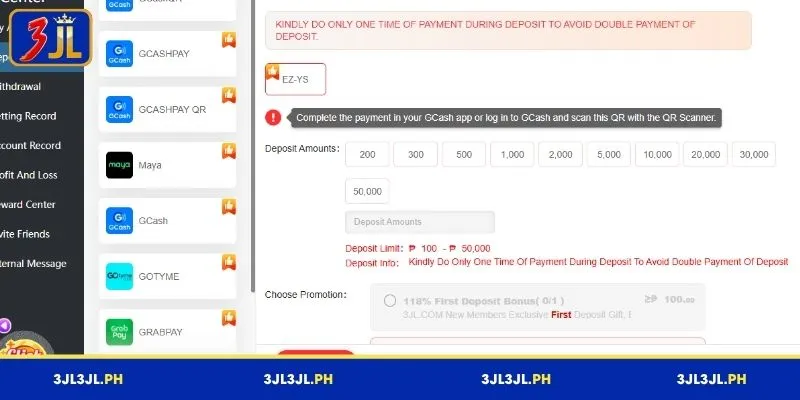
To ensure maximum financial flexibility for all local players, the transaction platform integrates multiple payment gateways with accommodating funding thresholds. The table below breaks down the primary channels, specific provider options, min-max limits, and key operational notes for every supported 3JL Deposit method:
| Payment Gateway | Available Channel Channels | Min Limit (₱) | Max Limit (₱) | Processing Speed | Important Channel Notes |
| GCashQR | MMPAY, PHPGO, MASAYA, Ai, YS-Shijie-JL, feibao | ₱100 | ₱50,000 | Instant – 2 Mins | Scan QR code strictly via GCash; do not use Maya |
| GCASHPAY | SAFE-YS, 196-YS, MMPAY-YS, YS-Shijie-JL | ₱100 | ₱50,000 | Instant – 3 Mins | Direct app authorization gateway |
| GCASHPAY QR | WIN2PAY-YS | ₱100 | ₱50,000 | Instant – 2 Mins | Scan QR using GCash App scanner tool |
| Maya | 196Pay, DAFA, Win2Pay, MMPAY | ₱100 | ₱50,000 | Instant – 3 Mins | Dedicated Maya e-wallet cash-in channel |
| GCash | PHPGO, MASAYA, YS-Shijie-JL | ₱100 | ₱50,000 | Instant – 3 Mins | Standard direct mobile number payment |
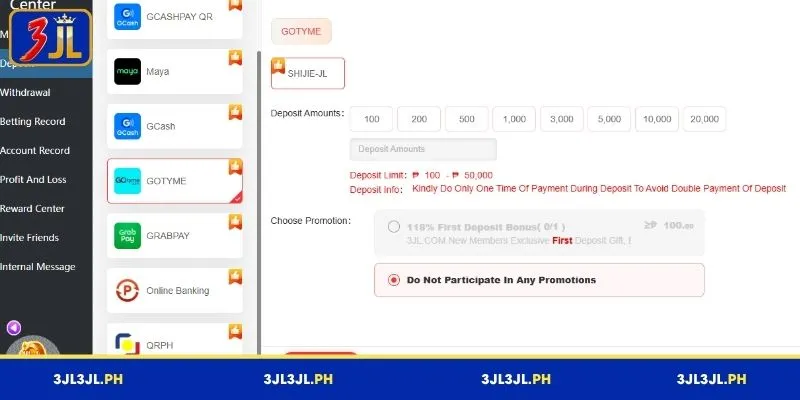
| GOTYME | SHIJIE-JL | ₱100 | ₱50,000 | 1 – 3 Mins | Digital banking app transfer portal |
| GRABPAY | feibao | ₱100 | ₱5,000 | 1 – 3 Mins | E-wallet cash-in capped at ₱5,000 |
| Online Banking | feibao | ₱500 | ₱50,000 | 3 – 5 Mins | Direct bank portal transfer option |
| QRPH | EZ-YS | ₱100 | ₱50,000 | Instant – 2 Mins | Universal QR code scanner compatibility |
Choosing your preferred 3JL Deposit channel ensures seamless bankroll additions suited to any budget, starting from as low as ₱100 PHP up to ₱50,000 PHP per transaction.
Detailed Step-by-Step Guide to 3JL Deposits
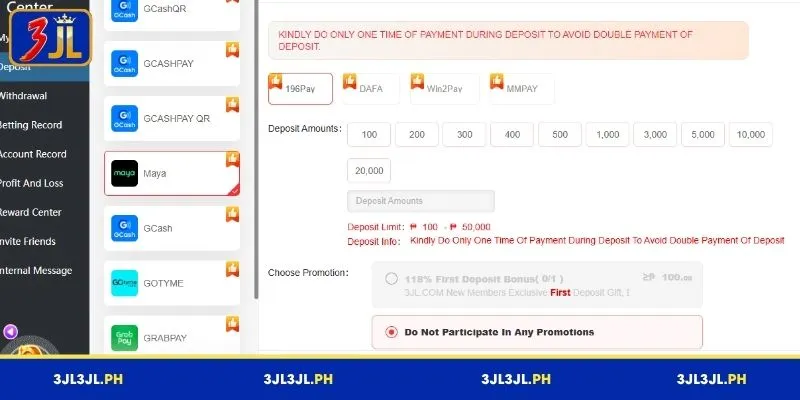
Submitting a cash-in request on the cashier interface is simple and straightforward. Follow these sequential steps to successfully execute a 3JL Deposit and credit your game balance without errors:
- Step 1:Log into your verified account dashboard on mobile or desktop and tap the blue “Deposit” button on the top navigation bar.
- Step 2:Select your target payment gateway from the left menu list (such as GCashQR, GCASHPAY, Maya, GOTYME, or QRPH).
- Step 3:Pick a specific payment channel variant (such as MMPAY, PHPGO, or SAFE-YS) depending on your selected payment provider.
- Step 4:Select a preset deposit amount button (e.g., ₱100, ₱200, ₱500, ₱1,000, ₱3,000, ₱5,000, ₱10,000, or ₱20,000) or enter a custom amount within allowed limits.
- Step 5:Choose an eligible promotion—such as the “118% First Deposit Bonus” (minimum ₱100 required)—or check “Do Not Participate In Any Promotions”.
- Step 6:Click the red “Apply for Deposit” button at the bottom to launch the secure checkout gateway.
- Step 7:Complete the payment authorization inside your e-wallet or banking app by scanning the generated QR code or approving the transaction OTP.
After confirming the transfer inside your wallet app, your 3JL Deposit will be processed automatically by the automated payment gateway.
Important Notes for Transactions on the Platform
To prevent unexpected delays or failed transfers during your 3JL Deposit, make sure to strictly follow these operational platform rules:
- Single Payment Rule:Kindly perform only one payment per generated deposit request to avoid double payment issues or mismatched transaction records.
- Scan Single-Use QR Codes:QR codes generated under the GCashQR or QRPH options are valid for a single scan only; never reuse an old QR code image for a new cash-in request.
- Strict App Matching:When choosing the GCashQR payment option, scan the displayed QR code exclusively with your GCash App scanner and do not use Maya.
- Verify Specific Limits:Mind the unique minimum and maximum limit boundaries before submitting, such as the ₱500 minimum required for Online Banking or the ₱5,000 maximum cap for GrabPay.
- Claim Welcome Bonuses Correctly:Ensure you select the 118% First Deposit Bonus radio button before clicking apply if you wish to claim new member rewards.
Observing these core instructions guarantees that every 3JL Deposit you submit processes instantly and smoothly every single time.
Common Issues and How to Resolve 3JL Deposit Problems
While the digital payment infrastructure is automated and highly stable, occasional mobile network or input errors can occur during a 3JL Deposit. Use these practical troubleshooting steps to resolve transaction issues effectively:
Deposit Funds Not Reflected in Game Balance
Under normal conditions, top-ups are processed automatically and reflected in your main wallet balance within a few moments. However, network congestion between the payment gateway and account servers can sometimes delay real-time balance updates.
- Check E-Wallet or Bank Receipt:Open your payment application (such as GCash, Maya, or your mobile banking app) and confirm that the funds were actually deducted from your personal balance.
- Verify Transaction Details:Ensure that the exact payment reference number, date, time stamp, and monetary value match your initial cash-in request.
- Capture Proof of Payment:Take a clear screenshot of your digital transaction receipt showing the complete reference code and total amount deducted.
- Review Deposit History:Navigate to your member account dashboard, select the “Deposit History” tab, and check whether the status displays Pending, Processing, or Failed.
- Contact Customer Service:If the funds do not appear within 5 to 10 minutes after deduction, launch the 24/7 Live Chat support window, submit your transaction screenshot, and provide the reference code so an agent can manually verify and credit your balance.
Scanned QR Code Rejected or Expired
Using QR codes for instant payments eliminates manual input errors, but each generated code is bound by strict security parameters and time constraints.
- Single-Use Limitation:Generated QR codes are strictly single-use system tokens. Attempting to scan a previously used code for a new request will result in an instant rejection or failed transaction error.
- Time-Out Windows:To protect users against stale session data and price fluctuations, payment QR codes feature an active expiration timer (typically valid for 3 to 5 minutes). Scanning a code after this window closes causes the payment system to decline the transfer.
- Resolution Steps:If your payment app displays a “QR Code Invalid” or “Expired Token” notification, return to the main cashier section on your platform dashboard. Select your preferred payment method, enter your desired cash-in amount again, and click “Apply for Deposit” to generate a completely fresh, active QR code.
Conclusion
Executing a 3JL Deposit provides players with a fast, safe, and versatile way to maintain their account balances using GCash, Maya, GOTYME, and QRPH gateways. By following the correct channel instructions and respecting deposit limits, you can enjoy non-stop, high-quality entertainment on 3JL with complete financial peace of mind.